
Short answer: Build the clip around a complete event chain: minimum setup → visible payoff → human reaction. Reframe each beat for vertical viewing, add only the packaging that clarifies the play, and render from the best available source.
The difficult part is not changing 16:9 into 9:16. It is preserving enough evidence for the viewer to understand the play while removing everything that does not support it.
A strong gaming Short usually answers three questions without explanation: What was the player trying to do? What changed? Why was the result worth watching?
Five decisions from source file to finished clip
These steps work whether you edit manually or use an AI clipper. Automation changes the speed, not the editorial test.
1. Keep a high-quality source
Record or download the cleanest source you can. Keep gameplay, game audio, microphone, and facecam readable enough to identify both the event and the reaction.
2. Find a complete moment
Treat the highlight as setup, payoff, and reaction. Start only as early as needed for context, and stay long enough for the result to register.
3. Reframe for the game
In 9:16, protect the reticle, target, kill feed, objective state, and facecam. A centered crop is rarely enough for every beat.
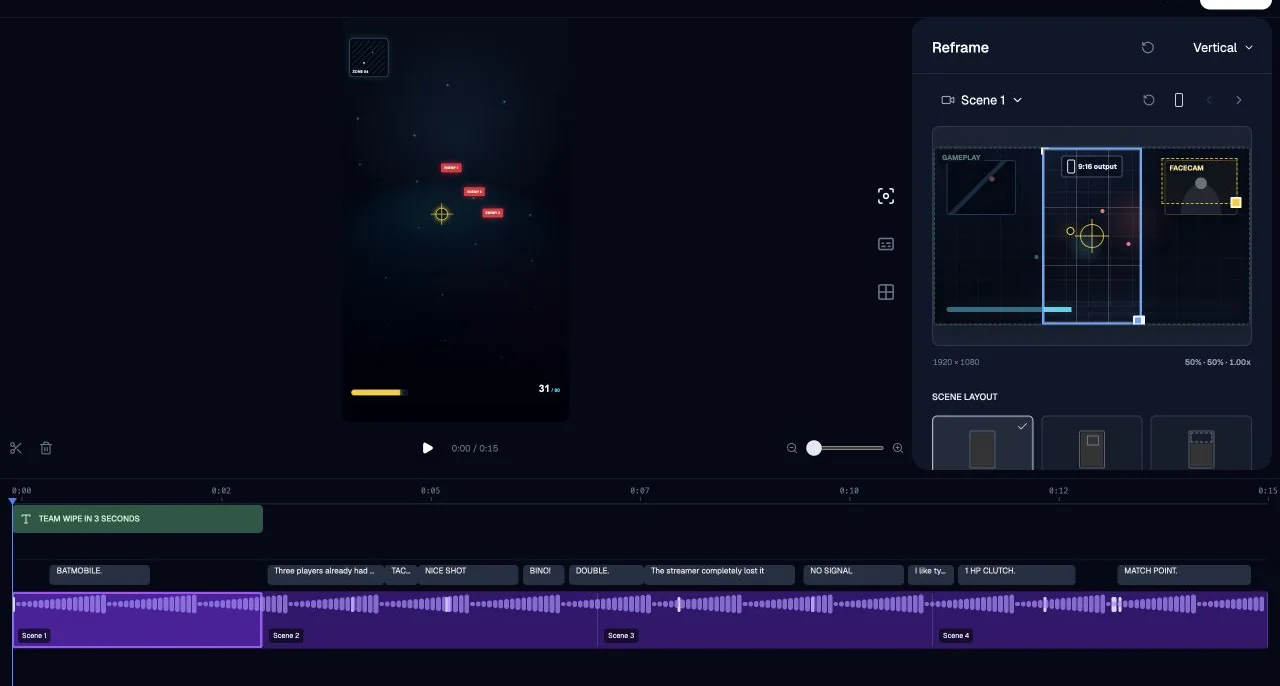
4. Package the payoff
Use captions, emphasis, sound, zoom, and motion only where they clarify the event. Continuous effects compete with the gameplay.
5. Export and test cold
Watch the clip without the original VOD context. If a new viewer cannot explain what happened and why it mattered, restore the missing evidence.
Vertical framing checklist
- Keep the active target and crosshair readable.
- Do not crop out the kill feed or objective state at payoff.
- Move or resize facecam only when it blocks game evidence.
- Use captions for speech that adds context or personality.
- Preview at phone size before final export.
Three common failure modes
Starting on the kill: the viewer sees a result without tension.
Following the wrong subject: the crop hides the threat or objective.
Over-editing: effects obscure the very event the clip is meant to show.
A simple quality test: Show the draft to someone who did not watch the stream. Ask them to describe the setup, payoff, and reaction. Their missing words point directly to missing shots or context.
Where AI helps
AI is useful for scanning long recordings, linking game events with speech and reactions, producing alternate crops, and applying repeatable finishing decisions. The output still needs one standard: would a new viewer understand the moment without opening the full VOD?
See the event-chain case study, browse AI clipping comparisons, or get ZoneClip Free.
Questions about this topic
How do I turn a gaming VOD into a Short?
Find a complete moment with minimum setup, a visible payoff, and a human reaction. Reframe each beat for 9:16, correct the captions, and export from the best available source.
How long should a gaming highlight clip be?
Use the shortest duration that still preserves the setup, decisive event, and reaction. Cutting context purely to reach a fixed duration can make the clip harder to understand.
Can AI completely edit gameplay Shorts automatically?
AI can scan recordings, propose moments, create crops, and apply repeatable edits, but a creator should still verify story continuity, framing, captions, and the final destination.