
Short answer — Is ZoneClip a free OpusClip alternative? Yes, for gaming creators who want Local AI: import files or supported video URLs, find highlights on your computer, edit, and publish without a subscription. Optional cloud analysis adds another compute choice; it does not unlock the core workflow. The products differ in features, results, and processing speed.
Monthly price and processing time
Pricing checked September 17, 2026. ZoneClip's cost per included source hour is $1.50 on Plus and approximately $0.97 on Pro. That is 75% and approximately 83% lower, respectively, than the corresponding OpusClip monthly plans. The wider workflow comparison below retains its July 30 review scope; this update specifically refreshes monthly prices and current ZoneClip capabilities.
| Monthly price (USD) | ZoneClip | OpusClip | Included minutes |
|---|---|---|---|
| $15/month | Plus: 600 min $1.50 per source hour | OpusClip Starter: 150 min $6.00 per source hour | 4× |
| $29/month | Pro: 1,800 min $0.97 per source hour | OpusClip Pro: 300 min $5.80 per source hour | 6× |
Monthly USD plans, checked October 16, 2026. OpusClip uses 1 credit per source-video minute. Comparison covers included processing time, not feature parity, speed, or output quality; annual discounts, promotions, and taxes are excluded. Official pricing · Credit rules.
ZoneClip keeps the full-quality original and final rendering on your device while optional cloud analysis receives the data it needs. Editing, rendering, exporting, and publishing use no additional ZoneClip analysis minutes. Eligible unused paid time rolls into the next cycle, capped at one monthly allowance; rollover is not claimed as unique to ZoneClip. See current plans and billing details.
Local mode is free and works fully offline after model setup. Import a local file or a supported YouTube, Twitch, direct MP4, or M3U8 URL; URL import itself needs a network connection and permission to use the source. Save Reframe, caption style, and position before analysis, then refine actual clips in the editor.
OpusClip is the broader and more mature cloud clipping product. ZoneClip is the narrower choice for creators who want a gaming-centered workflow, local-source rendering, and a $0 Free plan without a watermark.
Which tool fits your workflow?
Choose OpusClip if: Choose OpusClip when you need a mature web product for many content categories, prompt-driven clipping, a broad editing toolkit, team workflows, social publishing, or an API.
- Broad long-form clipping across podcasts, interviews, education, sports, and other formats.
- ClipAnything uses visual, audio, and sentiment signals and supports prompt-based moment discovery.
- A mature browser editor with captions, layouts, reframing, B-roll, voiceover, and publishing workflows.
- Team workspace and API options for higher-volume production.
Consider ZoneClip if: Consider ZoneClip when the source is a long gaming recording, you want multiple scored moments before editing, and keeping the original and final render on your own machine matters.
- A project view that exposes scenes, multiple clip candidates, time ranges, descriptions, and relative scores.
- Gameplay and facecam layouts, editable timed captions, templates, and a multi-track vertical editor.
- Original high-quality footage and final rendering stay on the creator's machine.
- Free is $0 forever, has no watermark, keeps source resolution including 4K sources, and has no commercial-use restriction.
Product maturity matters: ZoneClip is a newer official desktop release. OpusClip is an established public product with a broader feature set. ZoneClip's case is local-first architecture, Free-plan terms, and a focused gaming workflow—not a claim that OpusClip lacks multimodal or gameplay features.
Clip podcasts, interviews, and mixed content
Best fit: OpusClip. It is a mature general-purpose multimodal clipping product.
Team workspace or clipping API
Best fit: OpusClip. Its established workspace and API serve higher-volume production.
Review multiple gaming moments with context
Best fit: ZoneClip. ZoneClip exposes scenes, ranges, reasons, and relative scores.
No-watermark, source-resolution Free export
Best fit: ZoneClip. Those terms are part of the permanent $0 Free plan.
Keep the full-quality original local
Best fit: ZoneClip. The final render uses the original file on the creator's machine.
Side-by-side comparison
| Decision area | OpusClip | ZoneClip |
|---|---|---|
| Best fit | Creators and teams repurposing many types of long-form video in a mature cloud workflow. | Gaming creators turning local recordings or supported URLs into clips with lower-cost cloud analysis or free local processing. |
| Moment discovery | Multimodal ClipAnything analysis, prompt clipping, virality scoring, and broad content support. | Scene grouping and multiple candidates with ranges, plain-language context, and relative scores. |
| Editing | Browser-based captions, layouts including gameplay, reframing, trimming, B-roll, and voiceover. | Vertical gameplay reframing, facecam compositions, reusable templates, editable captions, and a multi-track timeline. |
| Free exports | The official pricing page describes animated captions with a watermark on the Free plan. | $0 forever with no watermark, no commercial-use restriction, and source-resolution export. |
| Publishing | Established social-account, scheduling, workspace, and API workflows; availability varies by plan and feature. | YouTube, TikTok, and Instagram connections, multi-account scheduling, a calendar, and supported performance sync are available; platform eligibility still applies. |
| Media path | Sources are imported or submitted into a cloud clipping workspace. | The original stays local; an analysis proxy may use the selected provider, and the final render uses the local original. |
ZoneClip product evidence
This current product screen shows workflow evidence, not a promise about model quality or post performance.
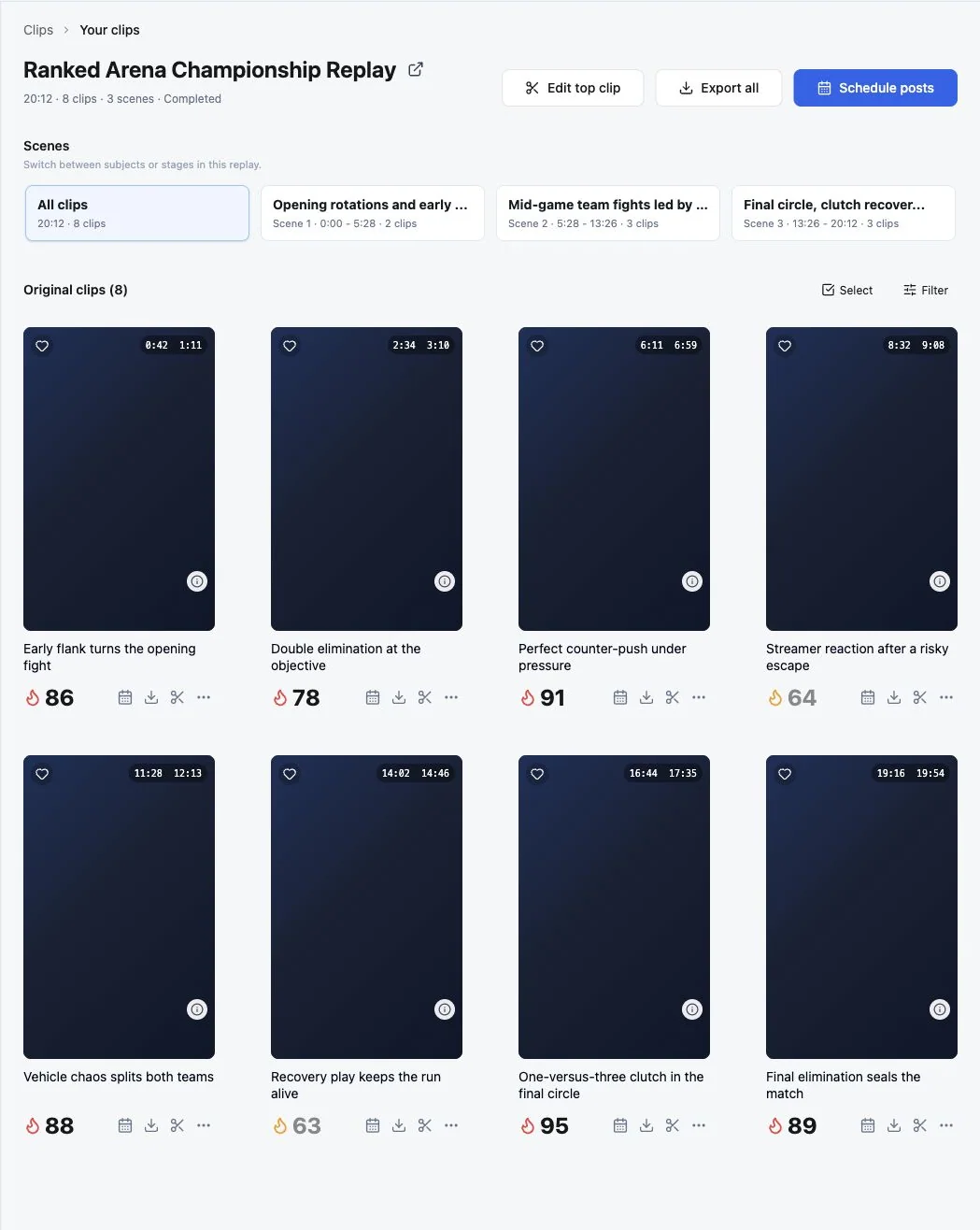
See how ZoneClip finds and scores multiple clips →
Run a repeatable comparison
- Use the same 60–90 minute gameplay recording and target a 30–60 second output.
- Keep default discovery settings, then record how many useful candidates each product returns.
- Export the first acceptable clip and count caption, framing, pacing, and context repairs.
- Compare the free export itself: watermark, resolution, and the work required before publishing.
- Choose based on repeated weekly workflow time—not one unusually strong or weak clip.
Official sources
Competitor products change. Verify current facts before making a paid decision.
- OpusClip product introduction — Official overview of ClipAnything, editing, workspace, input, and publishing capabilities.
- OpusClip pricing — Official plan and Free-export information; verify current limits before purchase.
- OpusClip layout and reframing — Official documentation for layouts, manual reframing, and the gameplay layout.
- OpusClip API — Official overview of the programmatic clipping workflow.
Questions about this topic
Does ZoneClip include more analysis time at the same monthly price?
Yes. At USD monthly prices checked September 17, 2026, ZoneClip Plus includes 600 minutes for $15 versus OpusClip Starter's 150; ZoneClip Pro includes 1,800 for $29 versus OpusClip Pro's 300. That is 4x and 6x the included source-video minutes, not equivalent features, speed, or output quality. Annual discounts and promotions are excluded.
Is ZoneClip a free OpusClip alternative?
Yes. Import files or supported video URLs, analyze and clip with Local AI, then edit, export and publish without a subscription. ZoneClip uses your own computer, with no watermark. Cloud analysis is optional. ZoneClip is a newer desktop release focused on gaming, not a feature-for-feature replacement for OpusClip.
Does OpusClip support gameplay videos?
Yes. OpusClip documents multimodal clipping and a gameplay layout. ZoneClip does not claim otherwise; its differentiation is a gaming-centered project, scoring, editing, and local-render workflow.
Which product is more mature?
OpusClip is the more mature public product today. ZoneClip is a newer official desktop release and should be evaluated on the specific gaming, local-first, and Free-plan requirements it is designed to serve.
Does ZoneClip upload the original recording?
ZoneClip is designed to keep the original high-quality file on the creator's machine. Local mode processes offline after model setup. Optional Zone Cloud or a remote custom provider receives the analysis data it needs; final rendering uses the local original.