
Short answer — Is ZoneClip a free Vizard alternative? Yes—when you primarily clip gaming VODs and want a permanent no-watermark Free plan with local-source rendering. Vizard is more mature for speech-led content, teams, browser collaboration, and broad social scheduling.
Vizard is the stronger choice for a mature browser-based repurposing and team workflow. ZoneClip is designed for creators who want gaming-specific review and editing while keeping the full-quality source and final render local.
Which tool fits your workflow?
Choose Vizard if: Choose Vizard when you need broad speech-led video repurposing, a full browser editor, team workspaces, multiple social platforms, automated scheduling, or API access.
- Broad AI clipping and editing for podcasts, webinars, interviews, and other speech-led long-form content.
- Team workspace, browser editor, storage, brand controls, and higher-resolution paid exports.
- Automated scheduling across multiple social platforms and accounts.
- API access on paid plans for automated submissions and exports.
Consider ZoneClip if: Consider ZoneClip when gameplay—not speech alone—drives the important moment, you want to inspect several scored candidates, and a no-watermark local-first Free workflow is the priority.
- Gameplay-oriented scene review, multiple clip scores, event context, and a focused candidate-to-editor path.
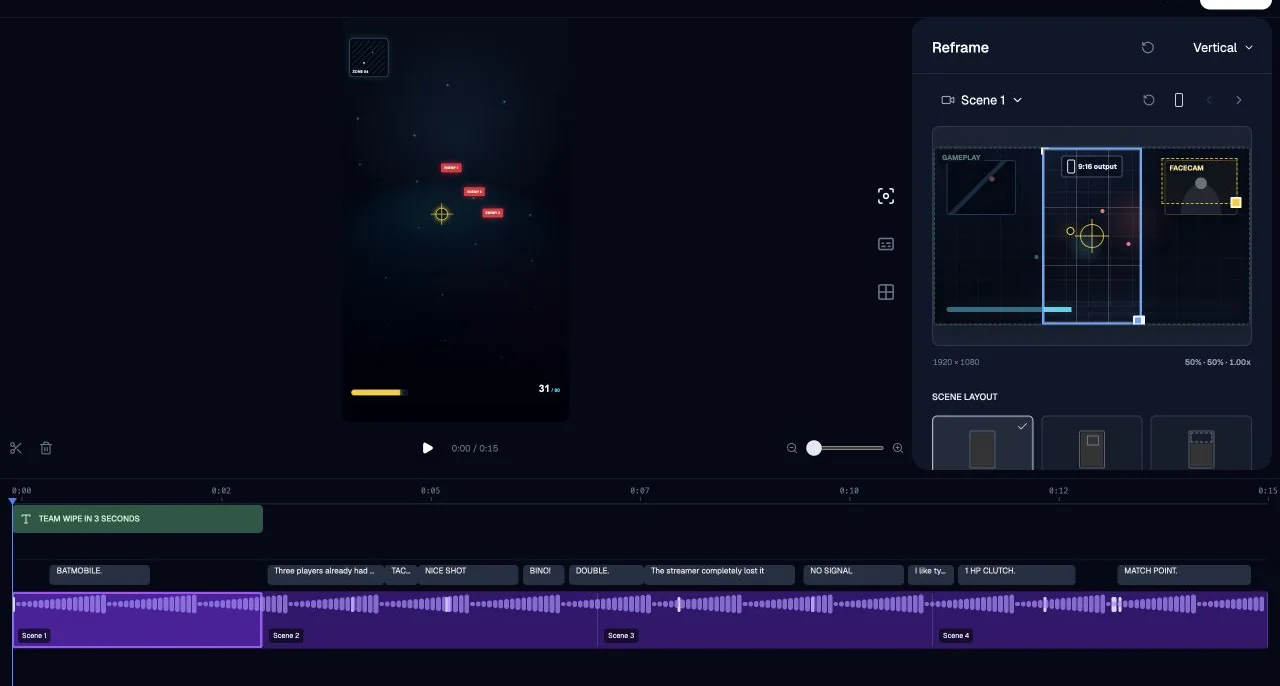
- Facecam and gameplay layouts, editable caption lines and presets, and a multi-track editor.
- Original high-quality footage and final rendering stay local.
- Free is $0 forever with no watermark, source-resolution export, and no commercial-use restriction.
Product maturity matters: ZoneClip is a newer official desktop release. Vizard is an established public cloud product with broader collaboration and publishing coverage. ZoneClip supports YouTube, TikTok, and Instagram connections, subject to platform review, permissions, and account eligibility; LinkedIn is planned.
Repurpose podcasts, webinars, and interviews
Best fit: Vizard. Its broad speech-led content workflow is more mature today.
Team workspace, API, or many social platforms
Best fit: Vizard. Those cloud collaboration and distribution workflows are established.
Find sparse highlights in gameplay
Best fit: ZoneClip. ZoneClip's current validation and review model are gaming-centered.
Use gameplay and facecam layouts
Best fit: ZoneClip. Its editor exposes dedicated gameplay compositions and templates.
Keep source-resolution Free exports local
Best fit: ZoneClip. Free has no watermark and final rendering uses the local original.
Side-by-side comparison
| Decision area | Vizard | ZoneClip |
|---|---|---|
| Best fit | Creators and teams repurposing speech-led content across many formats and platforms. | Gaming creators reviewing sparse highlights inside long local recordings. |
| Free plan | Official pricing lists 60 monthly credits, one social account, 720p export, full editor access, and three-day storage. | $0 forever, no watermark, source-resolution export, and no commercial-use restriction. |
| Editing | Mature browser editor for clips, captions, reframing, and broad content repurposing. | Gameplay and facecam composition, caption correction and styles, templates, and multi-track timing. |
| Publishing | Auto-scheduling across TikTok, YouTube, Instagram, Facebook, X, and LinkedIn with plan-dependent account limits. | YouTube, TikTok, and Instagram connections, multi-account scheduling, a calendar, and supported performance sync are available; platform eligibility still applies. |
| Collaboration and API | Shared workspaces and paid API options support team and automated workflows. | The desktop app centers on an individual desktop workflow; broader collaboration is not claimed. |
| Media path | Uploads are processed and stored in a cloud workspace according to the selected plan. | The full-quality original stays local, and the final render is produced from that local source. |
ZoneClip product evidence
This current product screen shows workflow evidence, not a promise about model quality or post performance.
Explore the ZoneClip gameplay editor →
Run a repeatable comparison
- Use one gameplay VOD with both speech and visually important game events.
- Compare which selected moments remain understandable without relying on transcript keywords alone.
- Measure the time needed to correct framing, facecam composition, captions, and pacing.
- Check the exact free-plan output resolution, watermark, storage window, and monthly capacity you need.
- If publishing matters, verify the platforms and account count you use today—not a planned roadmap.
Official sources
Competitor products change. Verify current facts before making a paid decision.
- Vizard pricing — Official Free-plan, export, storage, workspace, and account information.
- Vizard auto-scheduling guide — Official workflow and supported-platform information for automated scheduling.
- Vizard API pricing documentation — Official API access, credit use, and submission-limit information.
- Vizard workspace storage — Official storage and Free-project expiration guidance.
Questions about this topic
Is ZoneClip a Vizard alternative?
For gaming creators who prioritize local-source rendering and game-centered clip review, yes. For mature team collaboration, broad speech-led repurposing, and multi-platform cloud scheduling, Vizard is currently the stronger fit.
Which product has broader social publishing?
Vizard currently documents broader and more mature multi-platform scheduling. ZoneClip supports YouTube, TikTok, and Instagram connections, subject to platform review, permissions, and account eligibility; LinkedIn is planned.
Does ZoneClip have a watermark on Free?
No. ZoneClip Free is a permanent $0 plan with no watermark, source-resolution exports, and no commercial-use restriction.
Which product is better for podcasts and interviews?
Vizard is more mature for podcasts, interviews, webinars, and other speech-led formats today. ZoneClip's long-term scope is broader, but its current product focus and validation are gaming.