
General AI clip maker alternative
OpusClip
Mature cloud clipping platform for many content types, teams, publishing, and API workflows.
Looking for a free OpusClip alternative? Compare long-video clipping, gaming workflows, watermarks, publishing, and ZoneClip's local-first architecture.
Mature cloud clipping platform for many content types, teams, publishing, and API workflows.
Local-first gaming workflow with scored candidates, gameplay editing, and a permanent Free plan.
Yes—for long gaming recordings. ZoneClip Free costs $0, has no watermark, and keeps the original and final render local. OpusClip remains stronger for broad content types, teams, APIs, and a mature cloud workflow.
OpusClip is the broader and more mature cloud clipping product. ZoneClip is the narrower choice for creators who want a gaming-centered workflow, local-source rendering, and a $0 Free plan without a watermark.
These recommendations are task-specific. They are not an arbitrary overall score.
It is a mature general-purpose multimodal clipping product.
Its established workspace and API serve higher-volume production.
ZoneClip exposes scenes, ranges, reasons, and relative scores.
Those terms are part of the permanent $0 Free plan.
The final render uses the original file on the creator's machine.
Choose OpusClip when you need a mature web product for many content categories, prompt-driven clipping, a broad editing toolkit, team workflows, social publishing, or an API.
Consider ZoneClip when the source is a long gaming recording, you want multiple scored moments before editing, and keeping the original and final render on your own machine matters.
ZoneClip is currently in private beta. OpusClip is an established public product with a broader feature set. ZoneClip's case is local-first architecture, Free-plan terms, and a focused gaming workflow—not a claim that OpusClip lacks multimodal or gameplay features.
Capabilities and plan boundaries are based on official public information reviewed on July 30, 2026.
| Decision area | OpusClip | ZoneClip |
|---|---|---|
| Best fit | Creators and teams repurposing many types of long-form video in a mature cloud workflow. | Gaming creators turning long local recordings into ranked, editable social clips. |
| Moment discovery | Multimodal ClipAnything analysis, prompt clipping, virality scoring, and broad content support. | Scene grouping and multiple candidates with ranges, plain-language context, and relative scores. |
| Editing | Browser-based captions, layouts including gameplay, reframing, trimming, B-roll, and voiceover. | Vertical gameplay reframing, facecam compositions, reusable templates, editable captions, and a multi-track timeline. |
| Free exports | The official pricing page describes animated captions with a watermark on the Free plan. | $0 forever with no watermark, no commercial-use restriction, and source-resolution export. |
| Publishing | Established social-account, scheduling, workspace, and API workflows; availability varies by plan and feature. | YouTube connection, multi-channel scheduling, calendar, and performance sync are in beta; other platforms are planned. |
| Media path | Sources are imported or submitted into a cloud clipping workspace. | The original stays local; an analysis proxy may use the selected provider, and the final render uses the local original. |
This is a current ZoneClip product screen using reproducible demo data. It shows workflow evidence, not a claim about final model quality or post performance.
See how ZoneClip finds and scores multiple clips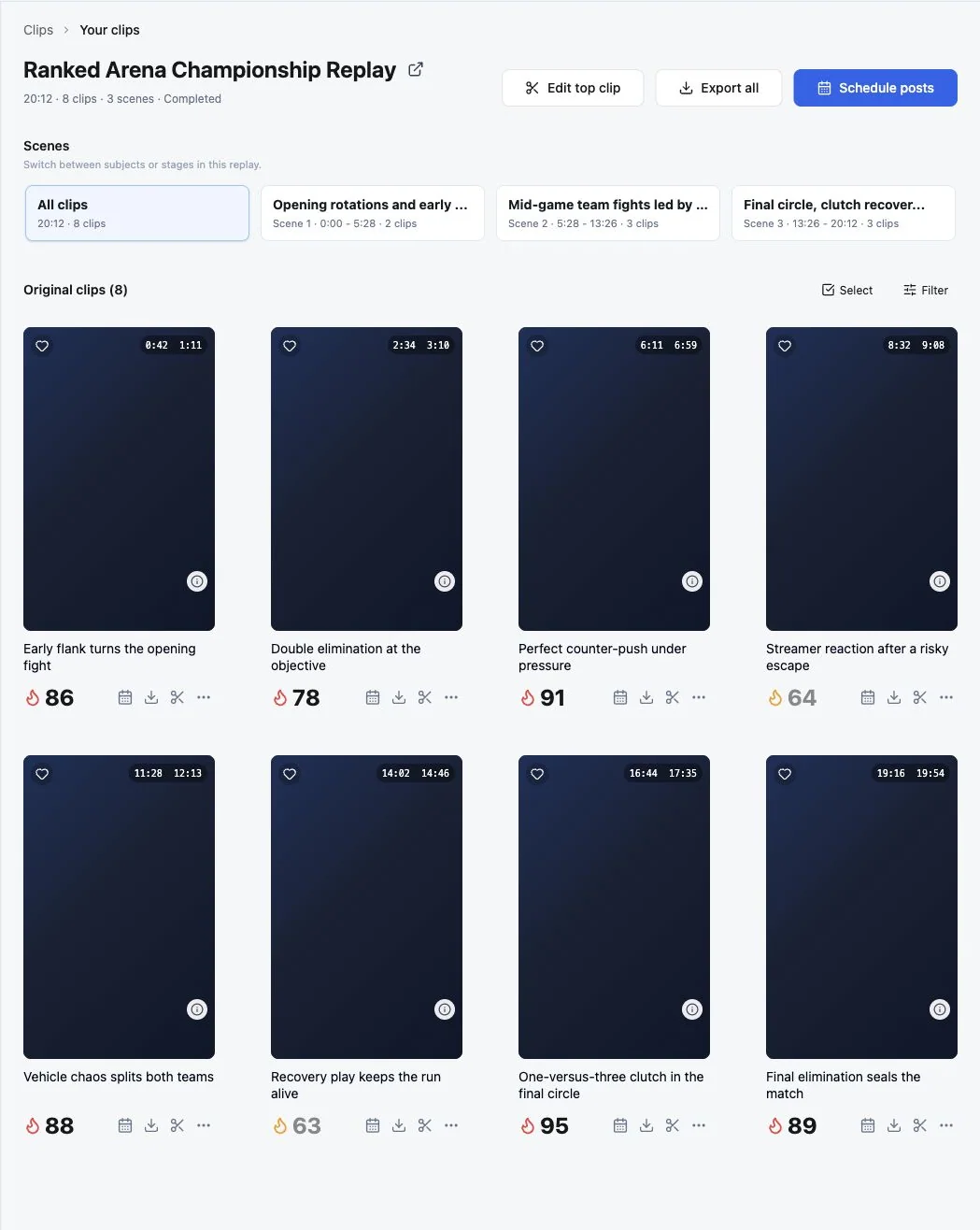
Current public product documentation, ZoneClip's current build, plan boundaries, and workflow structure.
A universal quality winner. Final clip quality depends on the source, game, settings, and version, so test your own VOD.
ZoneClip Free is $0 forever with no watermark and source-resolution exports, but ZoneClip is still a private beta and is narrower than OpusClip. It is most relevant as an alternative for gaming creators who value local-source rendering.
Yes. OpusClip documents multimodal clipping and a gameplay layout. ZoneClip does not claim otherwise; its differentiation is a gaming-centered project, scoring, editing, and local-render workflow.
OpusClip is the more mature public product today. ZoneClip is in private beta and should be evaluated on the specific gaming, local-first, and Free-plan requirements it is designed to serve.
ZoneClip is designed to keep the original high-quality file on the creator's machine. A lightweight analysis proxy may be sent to the selected local, custom, or remote provider; final rendering uses the local original.
ZoneClip Free is $0 forever: no watermark, no commercial-use restriction, and source-resolution export.
Request early access